

CRM assistant
Your CRM stays accurate, without your team clicking around in it.
Your people update their sessions and customer details with a normal chat message, in the chat app they already use. A digital assistant checks it against your rules, records it correctly in the CRM (your customer system) and only involves the back office when it really has to.
For businesses with lots of coaches, advisers or trainers
See how it works
Ten people in one CRM, ten ways of filling it in
We built this for an organisation where lots of people book appointments. The names and examples on this page are fictional.
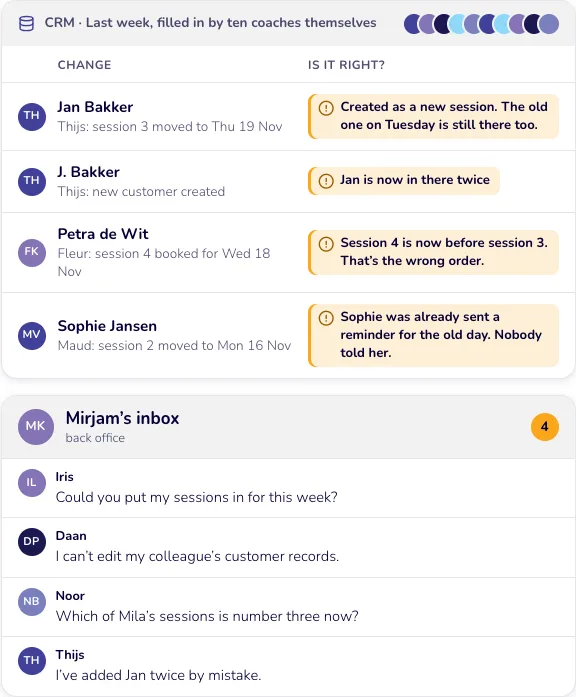
Monday morning. Mirjam from the back office opens the CRM, the system with all your customers and appointments. Last week, ten coaches updated it themselves, each in their own way.
Jan Bakker is listed twice. A customer got a reminder for the wrong day. And four ‘Could you just…?’ messages are waiting in her inbox.
She spends her Monday tidying up. Nobody does it wrong on purpose: a CRM just isn’t built for ten busy people squeezing in ‘quick’ updates between sessions.
CRM · Last week, filled in by ten coaches themselves
Thijs: session 3 moved to Thu 8 Oct
Created as a new session. The old one on Tuesday is still there too.
Thijs: new customer created
Jan is now in there twice
Fleur: session 4 booked for Wed 7 Oct
Session 4 is now before session 3. That’s the wrong order.
Maud: session 2 moved to Mon 5 Oct
Sophie was already sent a reminder for the old day. Nobody told her.
Mirjam’s inbox
- Iris Could you put my sessions in for this week?
- Daan I can’t edit my colleague’s customer records.
- Noor Which of Mila’s sessions is number three now?
- Thijs I’ve added Jan twice by mistake.
With the assistant: one chat message and it’s done properly
Follow two requests from Thijs. Click ‘Next’ each time.
Step 1
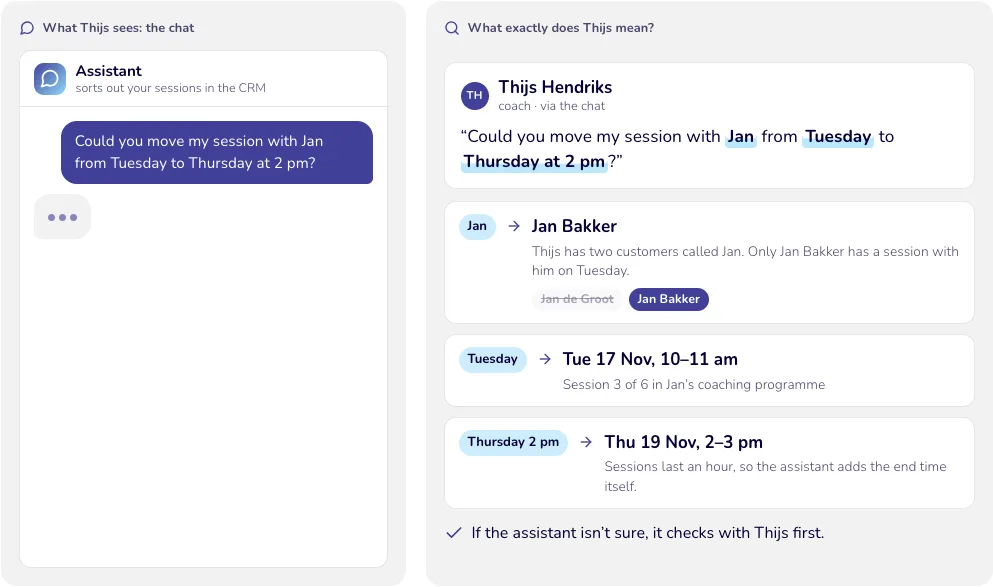
Thijs types what he wants and the assistant works out the rest
The assistant looks in the CRM to work out which Jan, which session and which Thursday Thijs means.
What exactly does Thijs mean?
- “Could you move my session with Jan from Tuesday to Thursday at 2 pm?”
- Thijs has two customers called Jan. Only Jan Bakker has a session with him on Tuesday.
- Session 3 of 6 in Jan’s coaching programme
- Sessions last an hour, so the assistant adds the end time itself.
If the assistant isn’t sure, it checks with Thijs first.
Step 2
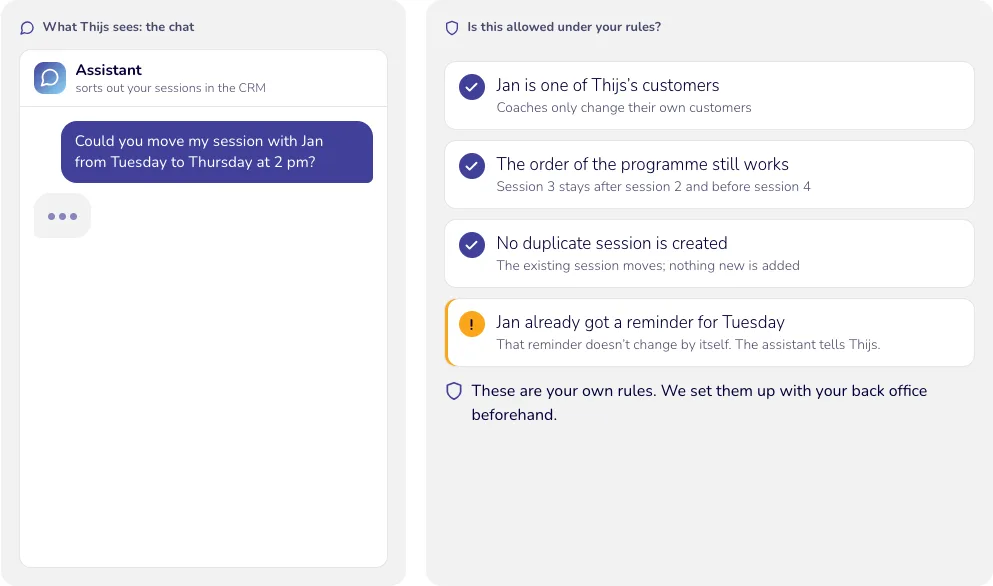
The assistant checks the rules
Before anything changes, the assistant checks whether it fits your rules.
Is this allowed under your rules?
- Jan is one of Thijs’s customers Coaches only change their own customers
- The order of the programme still works Session 3 stays after session 2 and before session 4
- No duplicate session is created The existing session moves; nothing new is added
- Jan already got a reminder for Tuesday That reminder doesn’t change by itself. The assistant tells Thijs.
These are your own rules. We set them up with your back office beforehand.
Step 3
Thijs says yes, and the CRM is updated
The CRM only changes once Thijs has seen the change and said ‘yes’.
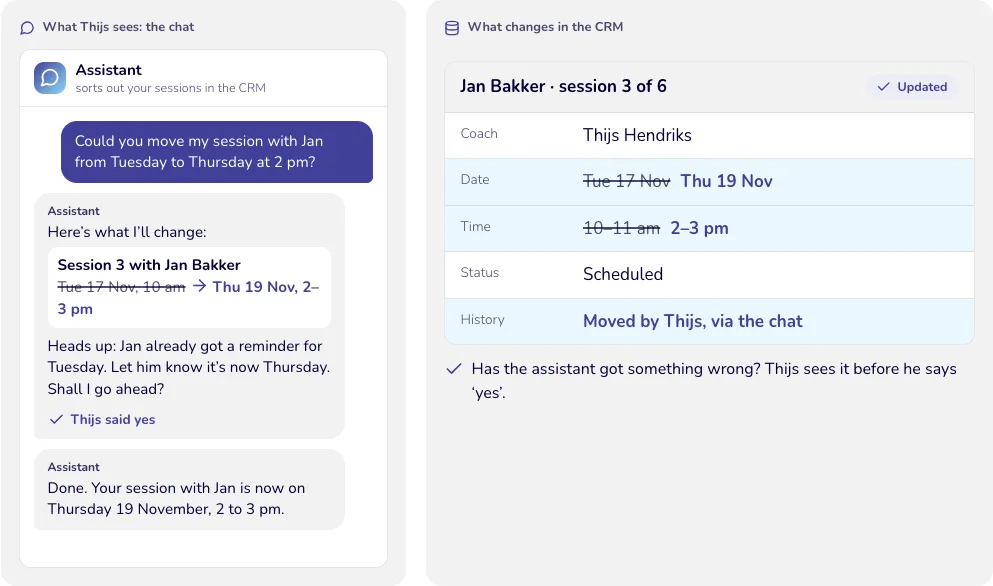
What changes in the CRM
- Here’s what I’ll change: Session 3 with Jan Bakker
- Heads up: Jan already got a reminder for Tuesday. Let him know it’s now Thursday. Shall I go ahead?
- Moved by Thijs, via the chat
- Thijs said yes
- Done. Your session with Jan is now on Thursday 8 October, 2 to 3 pm.
Has the assistant got something wrong? Thijs sees it before he says ‘yes’.
Step 4
The back office only when it’s really needed
If a request falls outside the rules, the assistant passes it to the back office with all the details.
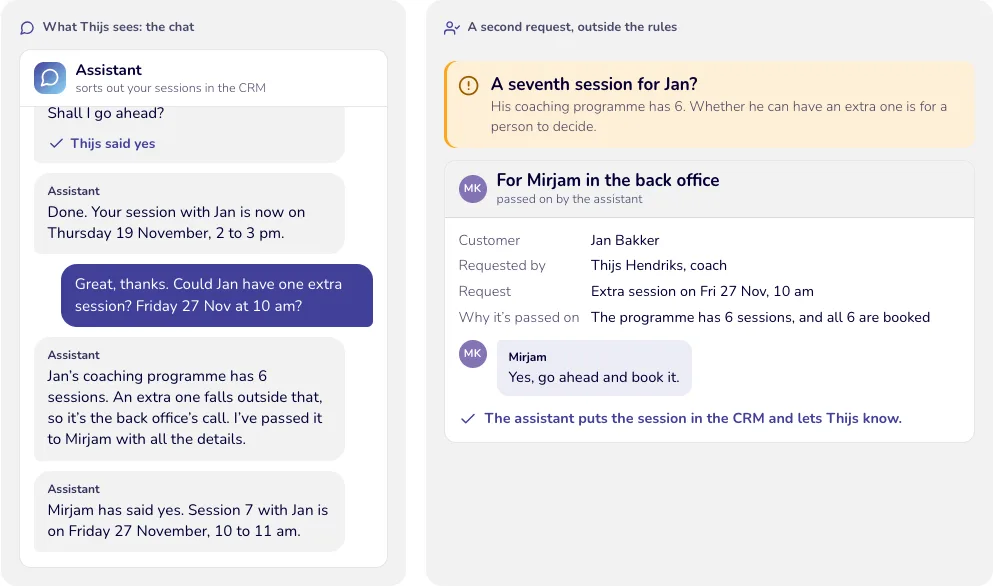
A second request, outside the rules
- A seventh session for Jan? His coaching programme has 6. Whether he can have an extra one is for a person to decide.
- For Mirjam in the back office passed on by the assistant
- The programme has 6 sessions, and all 6 are booked
- Great, thanks. Could Jan have one extra session? Friday 16 Oct at 10 am?
- Jan’s coaching programme has 6 sessions. An extra one falls outside that, so it’s the back office’s call. I’ve passed it to Mirjam with all the details.
- Mirjam Yes, go ahead and book it.
- Mirjam has said yes. Session 7 with Jan is on Friday 16 October, 10 to 11 am.
The assistant puts the session in the CRM and lets Thijs know.
Example week, fictional details
A week later: the CRM is accurate and Mirjam has just two questions
The same ten coaches, but now everything goes through the assistant.
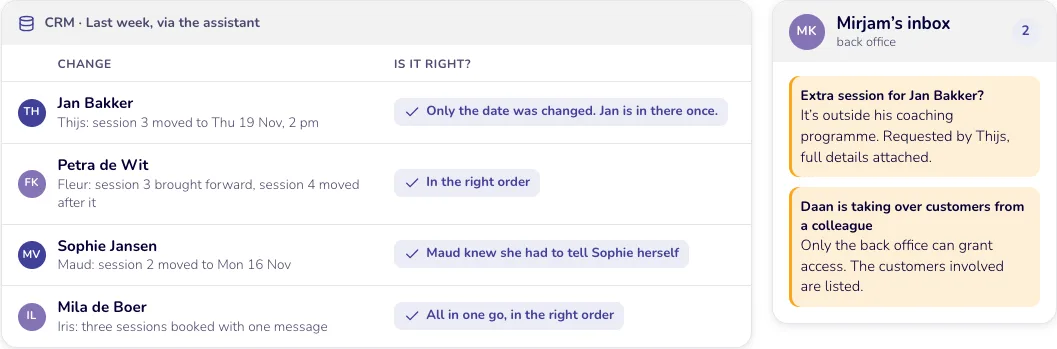
CRM · Last week, via the assistant
Thijs: session 3 moved to Thu 8 Oct, 2 pm
Only the date was changed. Jan is in there once.
Fleur: session 3 brought forward, session 4 moved after it
In the right order
Maud: session 2 moved to Mon 5 Oct
Maud knew she had to tell Sophie herself
Iris: three sessions booked with one message
All in one go, in the right order
Mirjam’s inbox
- Extra session for Jan Bakker? It’s outside his coaching programme. Requested by Thijs, full details attached.
- Daan is taking over customers from a colleague Only the back office can grant access. The customers involved are listed.
Your coaches chat, your back office decides, your CRM stays accurate
Everyone updates it by hand
- Moving a session Log in, find the customer, open the session, change the date and time
- The back office Fields every little request and clears up the mistakes
- Your data Duplicate customers, sessions in the wrong order, reminders for the wrong day
With the assistant
- Moving a session One chat message in your own words, then a quick ‘yes’
- The back office Only sees the exceptions, with full details attached
- Your data Complete, in the right place, with a record of who changed what
What is this costing you now? Work it out with your own estimate
How many hours a week do you spend tidying up and chasing things now?
- spent tidying up and chasing (based on 4 hours a week and 46 working weeks). We’d be happy to work out with you how much of that the assistant could take on.
- 184 hours a year
The names and details on this page are fictional.
Also works for
The same approach works just as well for
Anywhere lots of people have to keep one system up to date, and nobody enjoys doing it.
A sales team
“Spoke to Van Dijk. Quote to follow on Friday, call back in two weeks.” The customer, the note and the call-back are in the CRM straight away.
A plumbing and heating firm
“Job at Pietersen’s done. Two hours’ work, one new tap.” Engineers report it from the van, and the job sheet is ready to invoice.
An estate agency
“Viewing at Lindelaan 12 moved to Saturday 11 am.” They sort it out between two appointments. The diary and the property file stay up to date.
Sound familiar?
Let’s look at what this can do for you. Tell us how your team uses the CRM today, and we’ll show you what it could look like. We look at how your team works now, with your own CRM and chat app. We agree the rules with your back office. Your team chats, and the assistant keeps the CRM in order. Or go to twofeetup.com/contact