

Contact finder
Your customer list, completed without anyone having to look things up.
Software with AI finds the details you’d otherwise look up online yourself: phone number, email address, website and opening hours, for every address. All checked, plus addresses you didn’t have yet.
For companies with thousands of business addresses
See how it works
Sound familiar?
An address on its own isn’t enough.
Tuesday, 10.30 am
Jorien from the sales team is standing outside a café. It’s closed. It doesn’t open until four, and nothing on her list said so.
Back in the car, she looks up the next address. Phone number? Opening hours? Before she knows it, she’s spent an hour searching instead of seeing customers.
Imagine this
your list has 20,000 addresses and each one takes three minutes to look up. That’s 1,000 hours. Half a year of full-time work.
No phone number
You want to call, but first someone has to look the number up.
No opening hours
You turn up when the business is closed.
No email address or website
You want to send an offer or see what kind of business it is, but you don’t know where to look.
How it works
Your list is filled in, address by address.
Use Previous and Next to go through the five steps and follow a few lines of a customer list all the way through.
Step 1
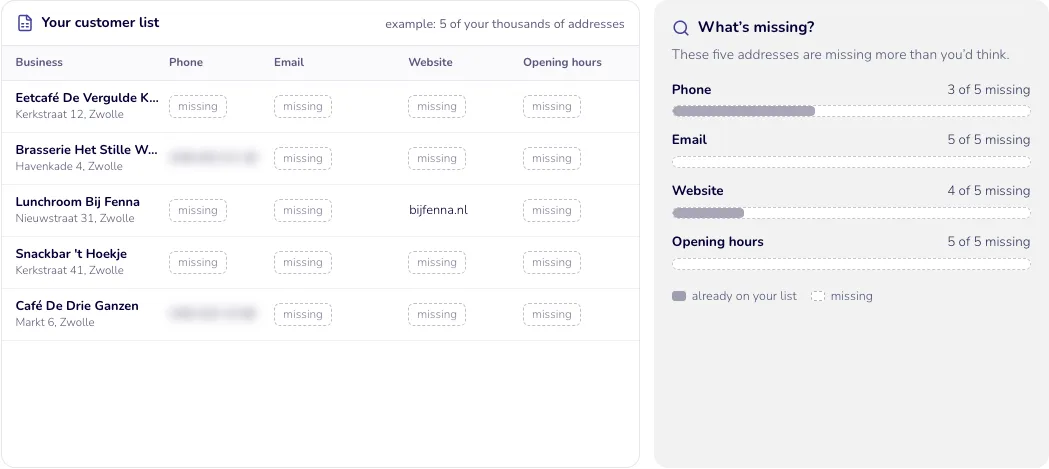
Your list, with gaps
You have the names and addresses. But phone numbers, email addresses, websites and opening hours are often missing.
What’s missing?
- These five addresses are missing more than you’d think.
- Phone: 3 of 5 missing
- Email: 5 of 5 missing
- Website: 4 of 5 missing
- Opening hours: 5 of 5 missing
Step 2
Searching where anyone can look
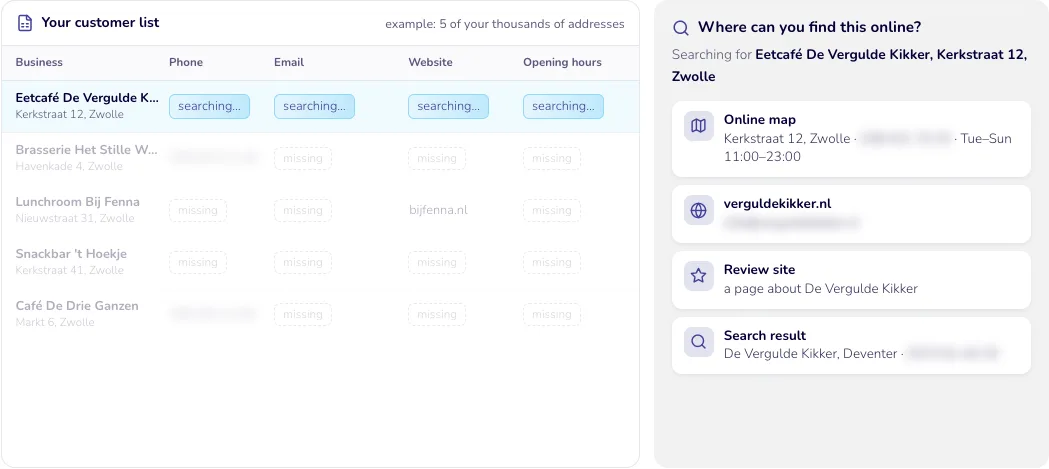
For every address, the AI searches places anyone can see online: maps, search engines and the business’s own website.
Where can you find this online?
- Searching for Eetcafé De Vergulde Kikker, Kerkstraat 12, Zwolle
- Online map: Kerkstraat 12, Zwolle · Tue–Sun 11:00–23:00
- Review site: a page about De Vergulde Kikker
Step 3
Checking it’s right
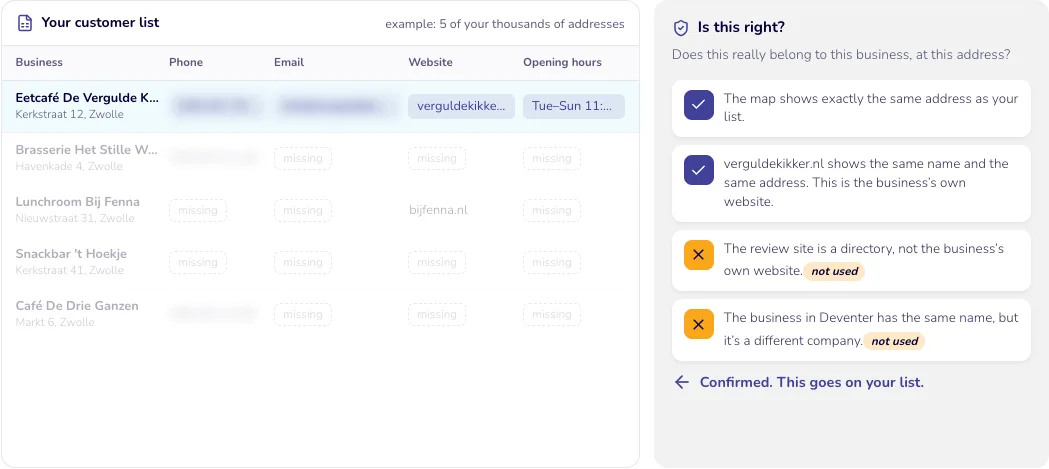
The AI checks that everything really belongs to this business at this address. Only that goes on your list. If in doubt, the cell stays empty.
Is this right?
- Does this really belong to this business, at this address?
- The map shows exactly the same address as your list.
- verguldekikker.nl shows the same name and the same address. This is the business’s own website.
- The review site is a directory, not the business’s own website.
- The business in Deventer has the same name, but it’s a different company.
Confirmed. This goes on your list.
Step 4
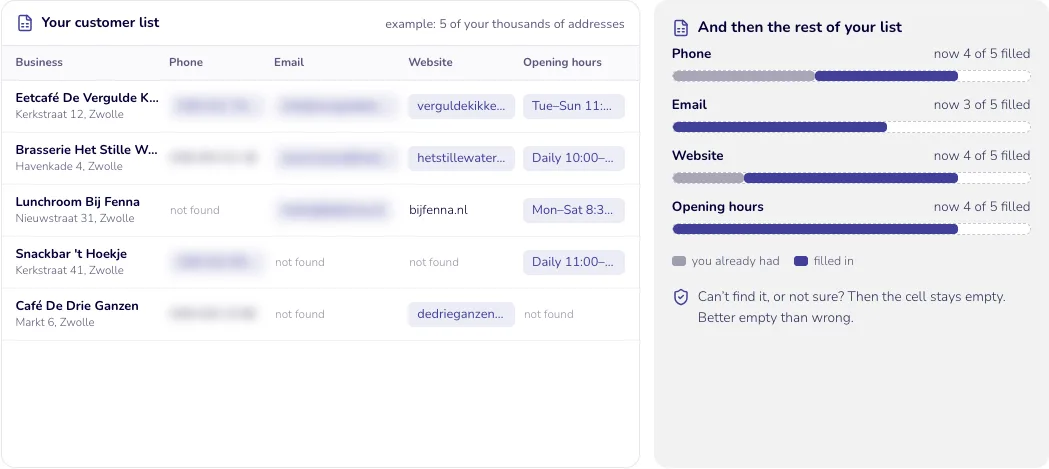
The same work for every address
It works like this for every address on your list, automatically. Even when there are tens of thousands.
And then the rest of your list
Can’t find it, or not sure? Then the cell stays empty. Better empty than wrong.
Step 5
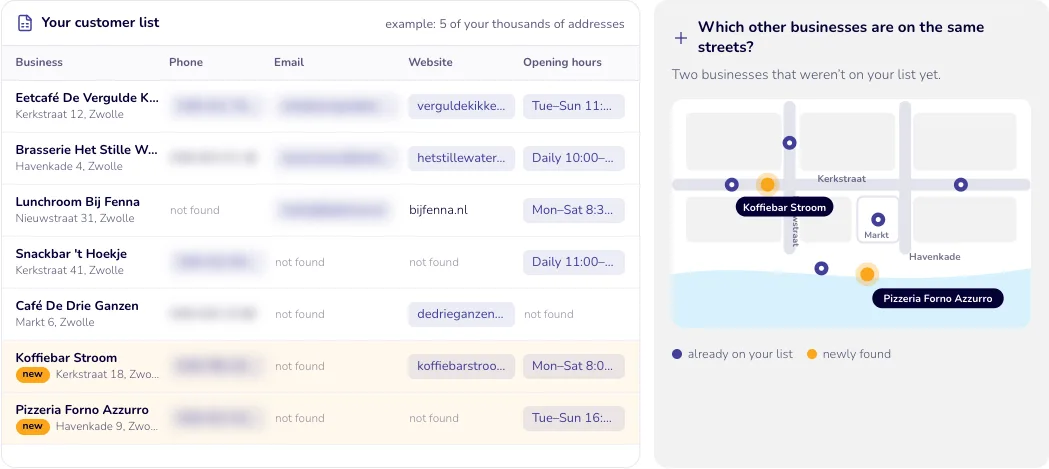
Extra: new addresses
While searching, the AI also comes across businesses that aren’t on your list yet. You get those too, on a separate list.
Which other businesses are on the same streets?
- Two businesses that weren’t on your list yet.
- Map showing the five known addresses and two new addresses on the same streets
The result
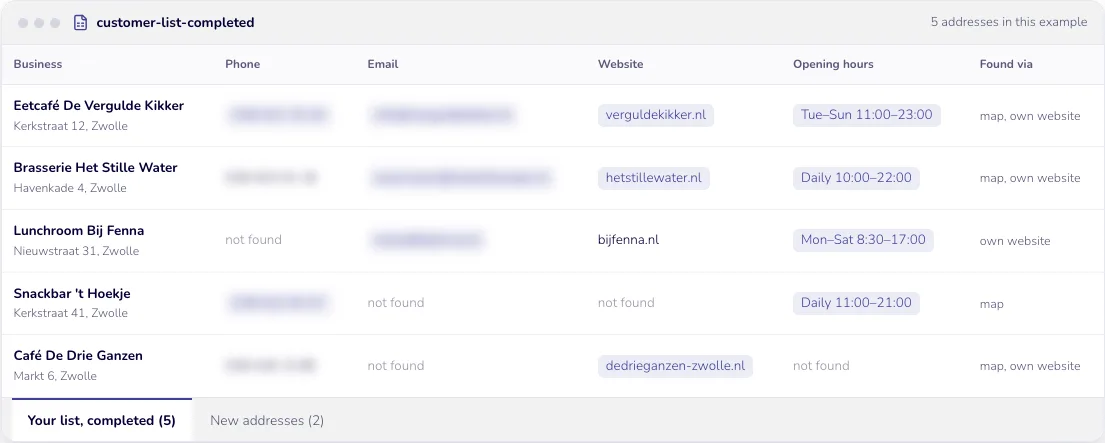
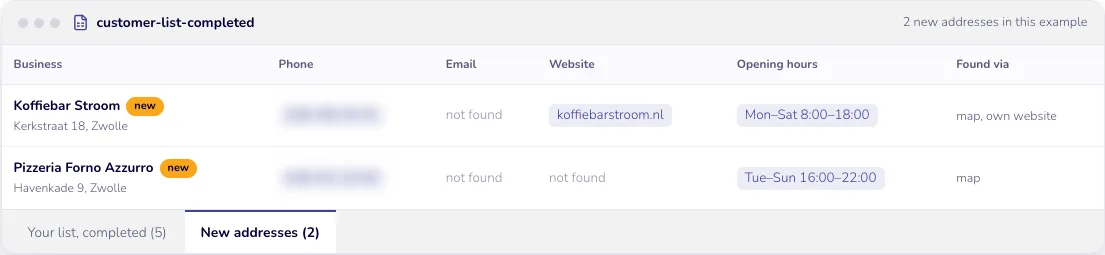
You get your own list back, completed.
For every address, you can see where each detail came from. Only public business details, such as the business’s own website and online maps. And a separate list of addresses you didn’t have.
Call without searching
The number is right there.
Visit when they’re open
You can plan visits for when someone’s in.
New addresses too
Businesses you didn’t know about, ready to contact.
Before and after
At a telecoms provider: 3 in 4 restaurants and cafés can now be called or emailed
Their list had 171,000 addresses of restaurants, cafés and other businesses. It had names and addresses, and nothing else.
Before
- businesses with just a name and an address. No phone numbers, email addresses, websites or opening hours.
- 171,000
Worked example
By hand, that’s more than 8,500 hours of searching, at three minutes per address. Almost five years of full-time work. Nobody does that, so the gaps were never filled.
After
- phone numbers
- 81,000
- email addresses
- 35,000
- businesses’ own websites
- 77,000
- businesses with opening hours
- 53,000
For restaurants and cafés, 3 in 4 can now be called or emailed. Across the whole list, it’s well over half.
- new addresses that weren’t on the list yet, including more than 7,500 restaurants and cafés
- +40,000
Real figures from a project for a telecoms provider. We’ve left out the name. We only count what passes an extra check: valid phone numbers and email addresses that don’t appear at five or more businesses at once, the business’s own website (not a directory or another company) and opening hours for at least three days. Everything is rounded down. The worked example is an estimate, not a measurement.
The businesses in the example are fictional. The figures under “Before and after” come from a real project.
Also works for
The same approach works for other businesses too
A manufacturer with dealers
Knows which dealers are still trading and how to reach them. And finds nearby shops that aren’t on its list yet.
A trade association
Keeps the details of all its member companies up to date: website, email address and phone number.
A healthcare supplier
Has all the GP practices, dentists and physiotherapists in the region in one list, with phone number and opening hours.
Sound familiar? Let’s look at what this can do for you.
Tell us what your list looks like and what’s missing from it. We’ll show you what we can fill in. A spreadsheet or an export from your own system is all we need to get started.