

Quote maker
Say what the customer wants. The quote and your team’s briefing are ready.
Your AI assistant works in a chat window in your browser. It knows your price list and the house rules you explain to it. It works out the quote in your own Word template and writes the staff briefing: who does what, and when. You check it and send it.
For anyone who quotes from their own price list
See how it works
The problem
After every customer meeting, the retyping starts.
Meet Femke. She’s the planner at an events venue. After every customer meeting, she looks up each request in the price list, types it all into Word and does the sums herself. Then she writes it all out again, for the technician and the bar staff.
It takes a lot of time.
At an events venue TwoFeetUp works for, the estimate at the start was half an hour per staff briefing, around 140 times a year. That’s about 70 hours, before you even count the quotes.
A forgotten surcharge is money out of your pocket.
On Sundays you charge extra for staff. In the example below, that’s €251.25 on a single quote. Forget it, and that money is gone.
Your team is the last to know.
If the briefing doesn’t match the quote, they only find out on the day.
How it works
You say it once. Your assistant does the rest.
Your assistant is a chat window in your browser. TwoFeetUp sets it up for you with your price list, your Word template and your house rules. Follow one request, from customer meeting to staff briefing.
Step 1
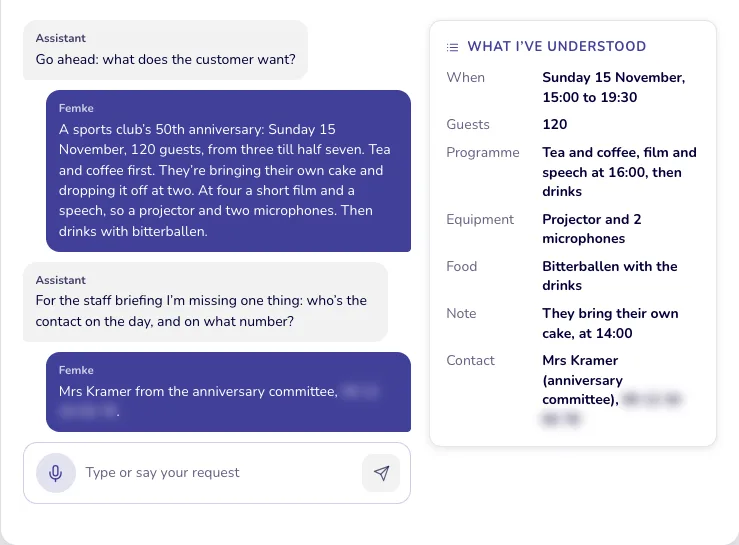
You say what the customer wants
Type it or say it out loud, the way you’d tell a colleague.
Go ahead: what does the customer want?
- A sports club’s 50th anniversary: Sunday 15 November, 120 guests, from three till half seven. Tea and coffee first. They’re bringing their own cake and dropping it off at two. At four a short film and a speech, so a projector and two microphones. Then drinks with bitterballen.
- For the staff briefing I’m missing one thing: who’s the contact on the day, and on what number?
- Mrs Kramer from the anniversary committee.
Not sent yet. You can read it through first.
Step 2
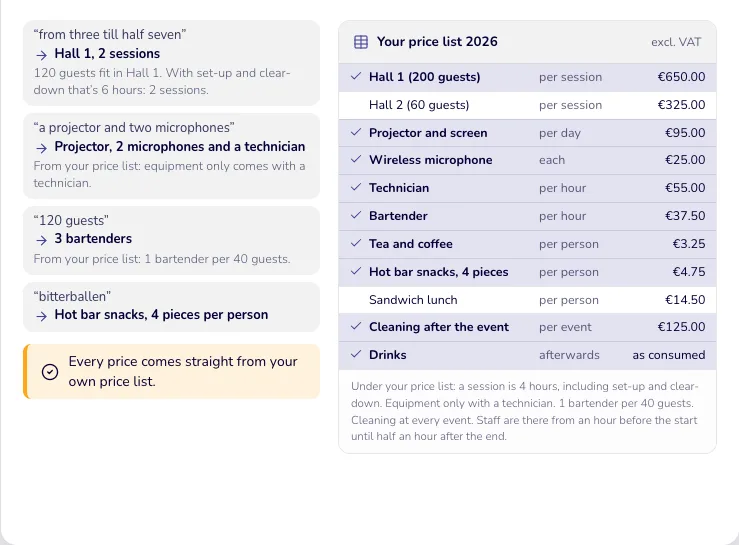
Your assistant looks everything up in your price list
Each request gets the right price from your own price list, plus everything that goes with it.
- “from three till half seven”
- Hall 1, 2 sessions
- 120 guests fit in Hall 1. With set-up and clear-down that’s 6 hours: 2 sessions.
- “a projector and two microphones”
- Projector, 2 microphones and a technician
- From your price list: equipment only comes with a technician.
- “120 guests”
- 3 bartenders
- From your price list: 1 bartender per 40 guests.
- “bitterballen”
- Hot bar snacks, 4 pieces per person
- Under your price list: a session is 4 hours, including set-up and clear-down. Equipment only with a technician. 1 bartender per 40 guests. Cleaning at every event. Staff are there from an hour before the start until half an hour after the end.
Every price comes straight from your own price list.
Step 3
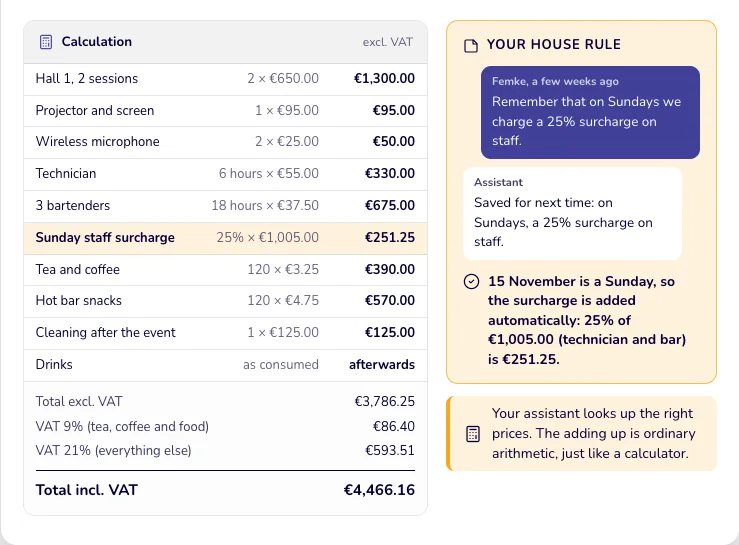
Your assistant does the sums, with your house rules
Quantities, hours and VAT are worked out, and a surcharge you explained once is added automatically.
Your house rule
- Remember that on Sundays we charge a 25% surcharge on staff.
- Saved for next time: on Sundays, a 25% surcharge on staff.
- 15 November is a Sunday, so the surcharge is added automatically: 25% of €1,005.00 (technician and bar) is €251.25.
Your assistant looks up the right prices. The adding up is ordinary arithmetic, just like a calculator.
What’s in this image?
Calculation (excl. VAT)
| Item | Sum | Amount |
|---|---|---|
| Hall 1, 2 sessions | 2 × €650.00 | €1,300.00 |
| Projector and screen | 1 × €95.00 | €95.00 |
| Wireless microphone | 2 × €25.00 | €50.00 |
| Technician | 6 hours × €55.00 | €330.00 |
| 3 bartenders | 18 hours × €37.50 | €675.00 |
| Sunday staff surcharge | 25% × €1,005.00 | €251.25 |
| Tea and coffee | 120 × €3.25 | €390.00 |
| Hot bar snacks | 120 × €4.75 | €570.00 |
| Cleaning after the event | 1 × €125.00 | €125.00 |
| Drinks | as consumed | afterwards |
| Total excl. VAT | €3,786.25 | |
| VAT 9% (tea, coffee and food) | €86.40 | |
| VAT 21% (everything else) | €593.51 | |
| Total incl. VAT | €4,466.16 |
Step 4
The quote is ready, in your own house style
A Word file with your logo and terms, for you to check and send yourself.
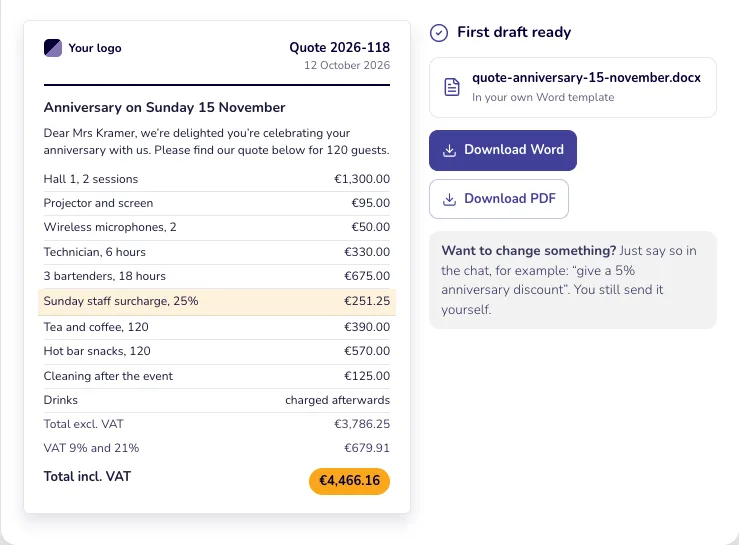
- Dear Mrs Kramer, we’re delighted you’re celebrating your anniversary with us. Please find our quote below for 120 guests.
Want to change something? Just say so in the chat, for example: “give a 5% anniversary discount”. You still send it yourself.
Step 5
The staff briefing for your team is ready too
From the same conversation: times, tasks and key details for your team, without prices.
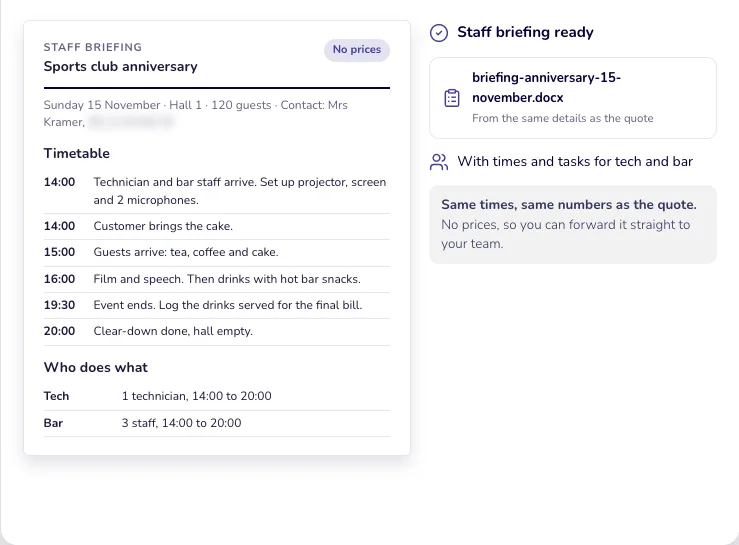
- With times and tasks for tech and bar
- Sunday 15 November · Hall 1 · 120 guests · Contact: Mrs Kramer
Same times, same numbers as the quote. No prices, so you can forward it straight to your team.
Example with fictional details.
The result
A quote for your customer, a briefing for your team.
Two documents from one conversation. You check them, change what you like and send them yourself.
The quote, for your customer
In your own Word template, with your logo, prices and terms.
The staff briefing, for your team
Who does what, and when. No prices, so you can forward it straight away.
Highlighted in orange: your house rules, applied automatically. The highlight only appears on this page, not in the file for your customer.
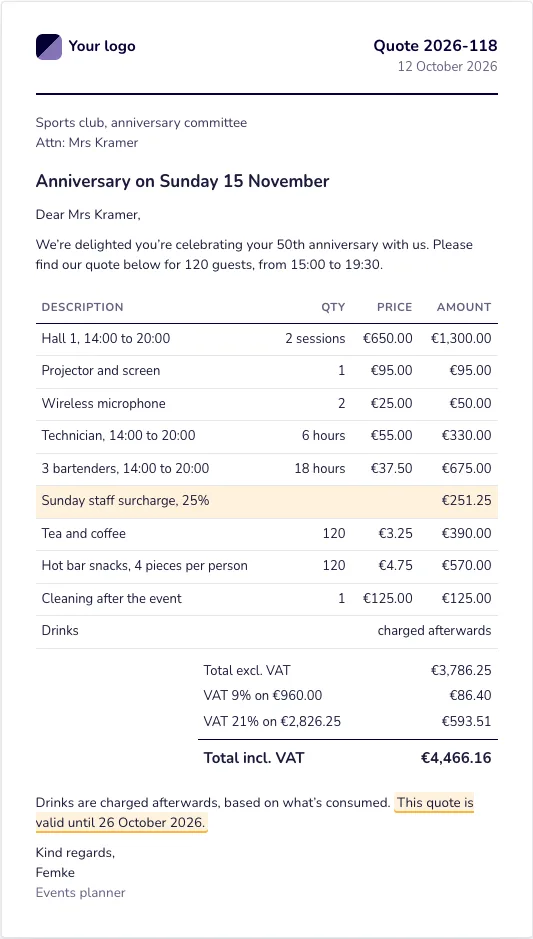
Dear Mrs Kramer,
We’re delighted you’re celebrating your 50th anniversary with us. Please find our quote below for 120 guests, from 15:00 to 19:30.
Drinks are charged afterwards, based on what’s consumed. This quote is valid until 26 October 2026.
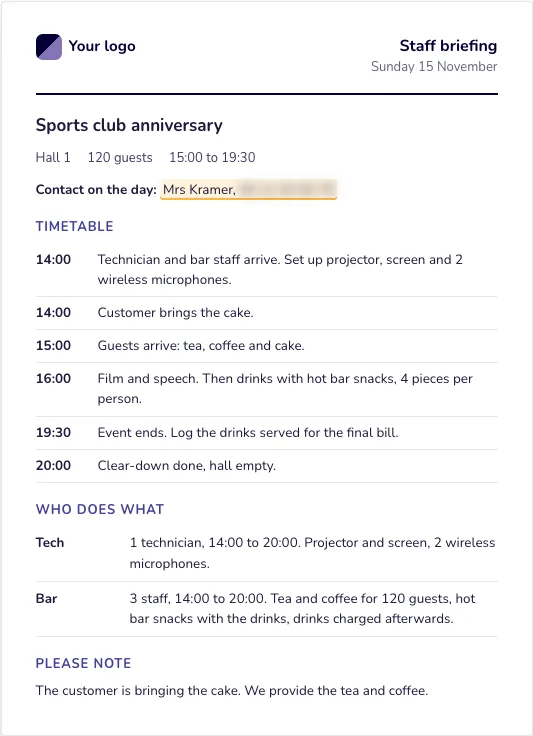
Staff briefing Sports club anniversary, Sunday 15 November: Hall 1, 120 guests, 15:00 to 19:30. Timetable
- 14:00 Technician and bar staff arrive. Set up projector, screen and 2 wireless microphones.
- 14:00 Customer brings the cake.
- 15:00 Guests arrive: tea, coffee and cake.
- 16:00 Film and speech. Then drinks with hot bar snacks, 4 pieces per person.
- 19:30 Event ends. Log the drinks served for the final bill.
- 20:00 Clear-down done, hall empty.
Who does what
- Tech 1 technician, 14:00 to 20:00. Projector and screen, 2 wireless microphones.
- Bar 3 staff, 14:00 to 20:00. Tea and coffee for 120 guests, hot bar snacks with the drinks, drinks charged afterwards.
Contact on the day: Mrs Kramer
Please note
- The customer is bringing the cake. We provide the tea and coffee.
What your assistant remembers
- On Sundays, a 25% surcharge on staff. Saved on 3 September
- Quotes are valid for 14 days. Saved on 12 June
- Always put the contact’s phone number in the staff briefing. Saved on 28 August
Say “remember that...” and it applies to your whole team from then on. Say “forget that” and it’s gone. You can see who added what, and you can change or remove anything.
Also useful
- Something missing? Your assistant will ask. For example a phone number, the number of guests or a price that isn’t on your list.
- Make changes in plain language. “Give 5% off” or “make the greeting more formal”, and the quote updates.
- Price changed? Say so or update your price list, and the next quote uses the new price.
- You start with what you already have. Your price list and your Word template, just as you use them now. TwoFeetUp sets up your assistant with them.
What’s in this image?
Quote 2026-118, 12 October 2026: Anniversary on Sunday 15 November. Sports club, anniversary committee, attn: Mrs Kramer; 120 guests from 15:00 to 19:30.
| Description | Qty | Price | Amount |
|---|---|---|---|
| Hall 1, 14:00 to 20:00 | 2 sessions | €650.00 | €1,300.00 |
| Projector and screen | 1 | €95.00 | €95.00 |
| Wireless microphone | 2 | €25.00 | €50.00 |
| Technician, 14:00 to 20:00 | 6 hours | €55.00 | €330.00 |
| 3 bartenders, 14:00 to 20:00 | 18 hours | €37.50 | €675.00 |
| Sunday staff surcharge, 25% | €251.25 | ||
| Tea and coffee | 120 | €3.25 | €390.00 |
| Hot bar snacks, 4 pieces per person | 120 | €4.75 | €570.00 |
| Cleaning after the event | 1 | €125.00 | €125.00 |
| Drinks | charged afterwards | ||
| Total excl. VAT | €3,786.25 | ||
| VAT 9% on €960.00 | €86.40 | ||
| VAT 21% on €2,826.25 | €593.51 | ||
| Total incl. VAT | €4,466.16 |
Drinks are charged afterwards, based on what’s consumed. This quote is valid until 26 October 2026.
Before and after
From retyping to checking.
Today
- The request: Notes that you write up later
- Prices: Look up and retype every price yourself
- Surcharges: From memory, or forgotten
- Sums: Work out quantities, hours and VAT yourself
- Staff briefing: Write everything out again
With your assistant
- The request: Say or type it straight after the meeting
- Prices: Straight from your own price list
- Surcharges: Explained once, remembered from then on
- Sums: Worked out for you, you check
- Staff briefing: From the same conversation as the quote
Also works for
Do you work from a price list, with a team that does the job?
Installers
Say what you saw at the customer’s. You get a quote with materials and hours from your own price list, and a job sheet for the engineer.
Caterers
Number of guests, menu and dietary needs go in. Out comes a quote with prices per person, and a prep list for the kitchen.
Hire companies
What, how many and for how long. A quote with day rates and deposit, and a loading list for the warehouse.
Sound familiar?
Let’s look at what this can do for you. Together we’ll go through your price list and how you make quotes today. What does it cost? A one-time setup fee, then a fixed monthly fee, and you can cancel any month. No charge per user. The first call is at no cost, with no obligation.