

Project portal
Everyone knows who’s doing what. No more ringing round.
Forward your meeting notes exactly as you wrote them. You get action points, each with a name and a date, in one place for every party. Each party only sees what’s meant for them.
For projects where several companies work together
See how it works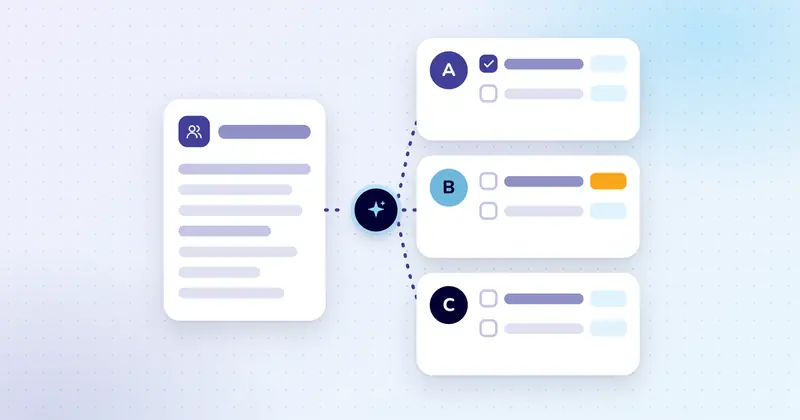
Recognise this?
Agreed at the meeting. But who’s doing it?
Monday, 7.40 am.
Femke is a project coordinator at an infrastructure subcontractor that replaces cables under the street. She has three missed calls from the main contractor: has the permit for Lindelaan been renewed yet?
That was agreed two weeks ago at the site meeting. But who was going to sort it? Femke searches her email and the group chat. The minutes are on the site manager’s laptop, and he’s on holiday. The permit turns out to have expired. The digging crew stands idle for a day.
- 3 missed calls: Niels, main contractor
- RE: RE: FW: Lindelaan schedule: See attachment. Or was it the previous version?
- Lindelaan group chat · 14 members: Niels: Who was sorting that permit again? I thought you were?
- Meeting minutes v3 FINAL (2).docx: On the site manager’s laptop
- permit!!
Everyone was there. Nobody owned it.
How it works
From meeting notes to a ticked-off action point
See how one site meeting flows through the project overview, step by step with Previous and Next.
Step 1
The notes go in
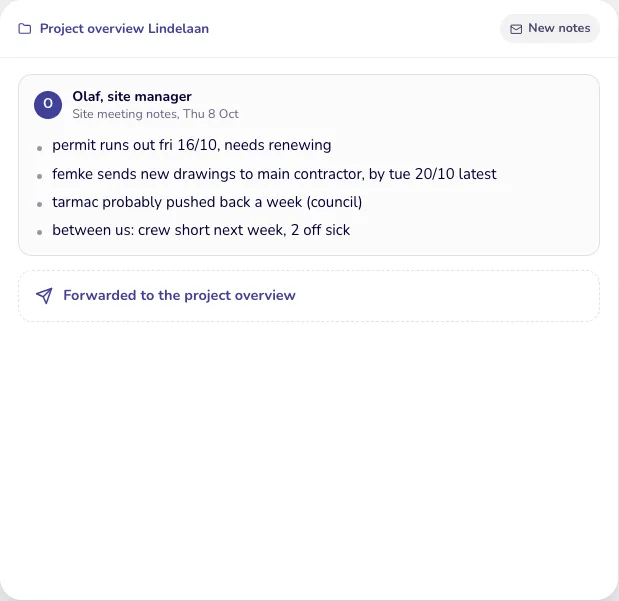
After the site meeting, site manager Olaf forwards his notes, just as he wrote them. Only what you forward goes in.
- permit runs out fri 16/10, needs renewing
- femke sends new drawings to main contractor, by tue 20/10 latest
- tarmac probably pushed back a week (council)
- between us: crew short next week, 2 off sick
Step 2
The AI picks out what, who and when
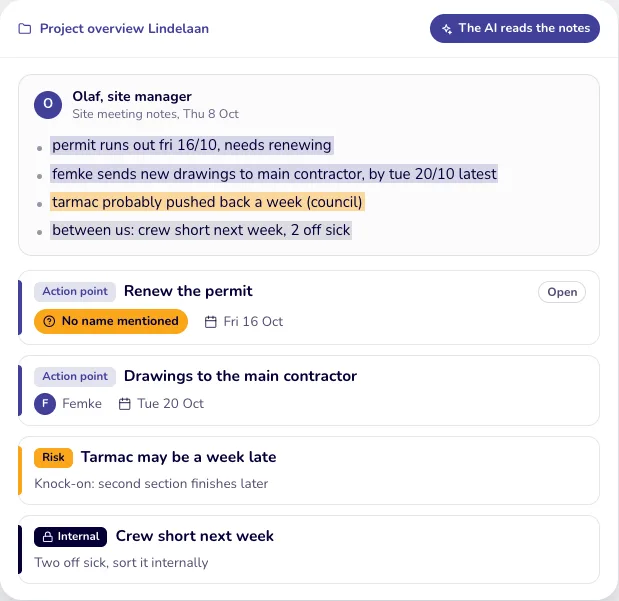
The AI reads the notes like a careful colleague and turns every agreement into an action point with a name and a date. If a name is missing, as with the permit, you see it straight away.
- Action point: Renew the permit (No name mentioned)
- Action point: Drawings to the main contractor
- Risk: Tarmac may be a week late (Knock-on: second section finishes later)
- Internal: Crew short next week (Two off sick, sort it internally)
Step 3
Each point goes to the people it concerns
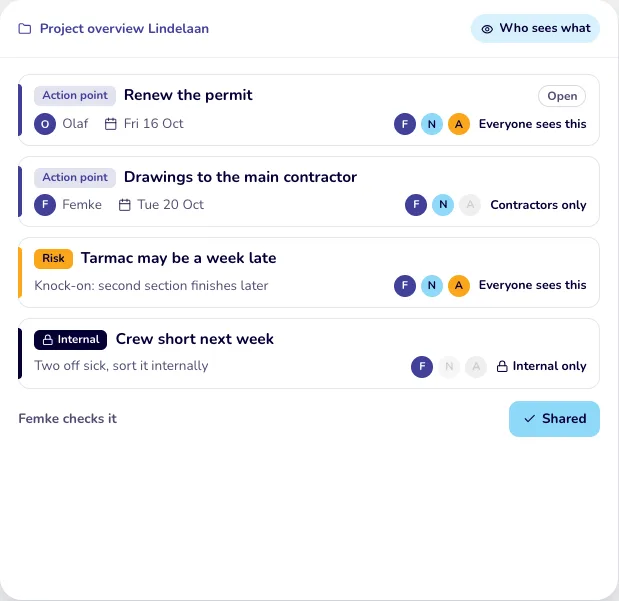
Femke checks it and assigns the permit to Olaf. The AI suggests who gets to see each point. Internal matters stay within your team.
- Renew the permit: Everyone sees this
- Drawings to the main contractor: Contractors only
- Tarmac may be a week late: Everyone sees this
- Crew short next week: Internal only
Step 4
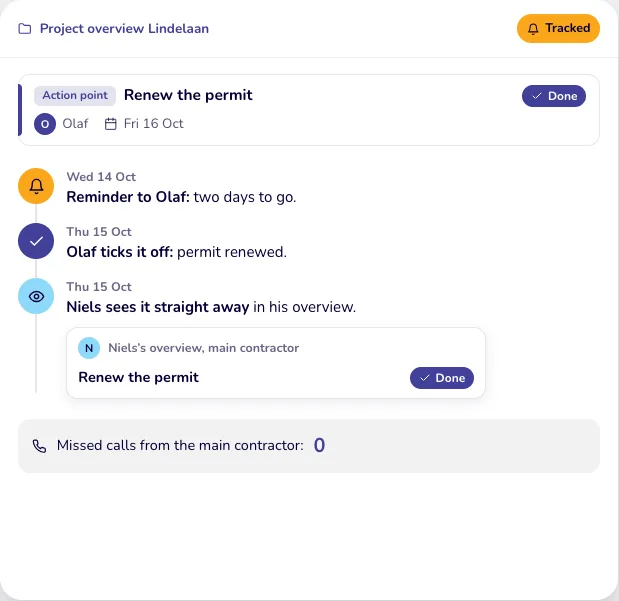
Deadlines are tracked
Two days before the deadline, Olaf gets a reminder. Once he ticks it off, the main contractor sees it straight away. Nobody has to pick up the phone.
- Reminder to Olaf: two days to go.
- Olaf ticks it off: permit renewed.
- Niels sees it straight away in his overview.
- Missed calls from the main contractor: 0
What already exists
The shared project overview. Reading meeting notes, hiding individual points and sending reminders are parts we build for you, tailored to your situation.
The result
Everyone sees what’s waiting for them
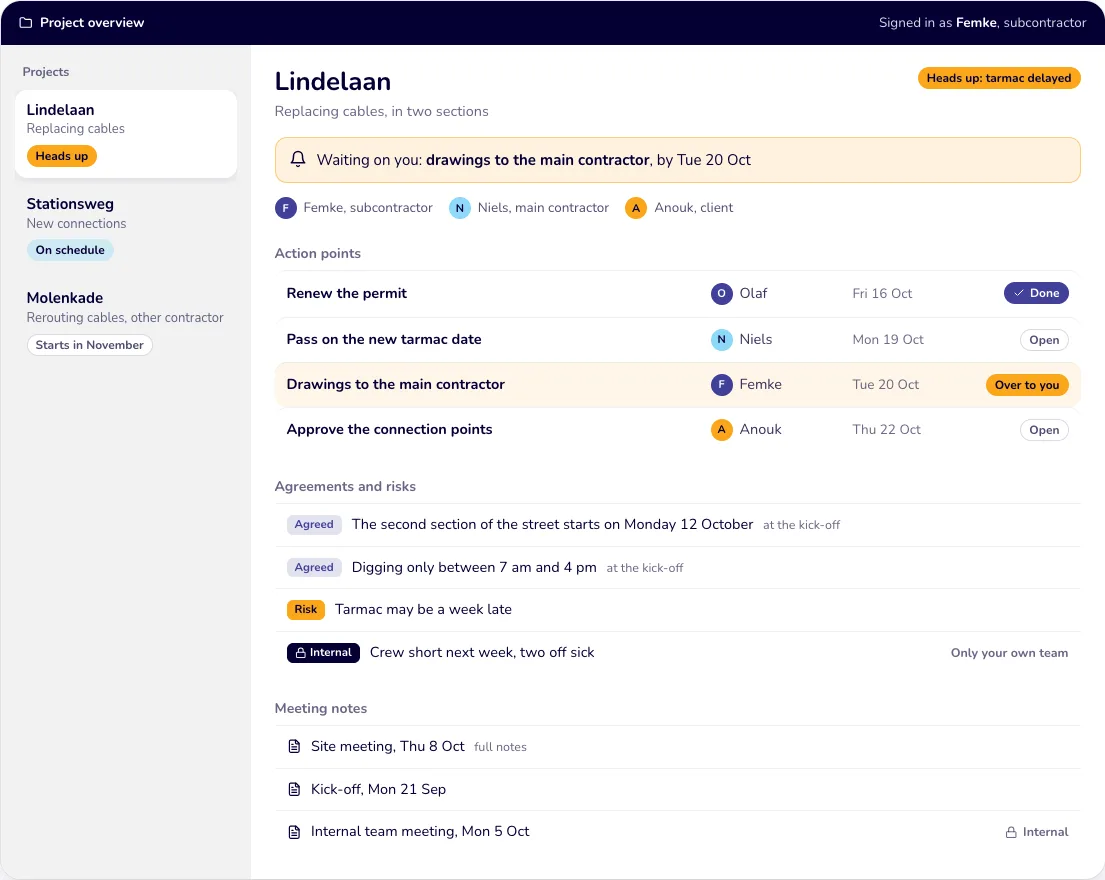
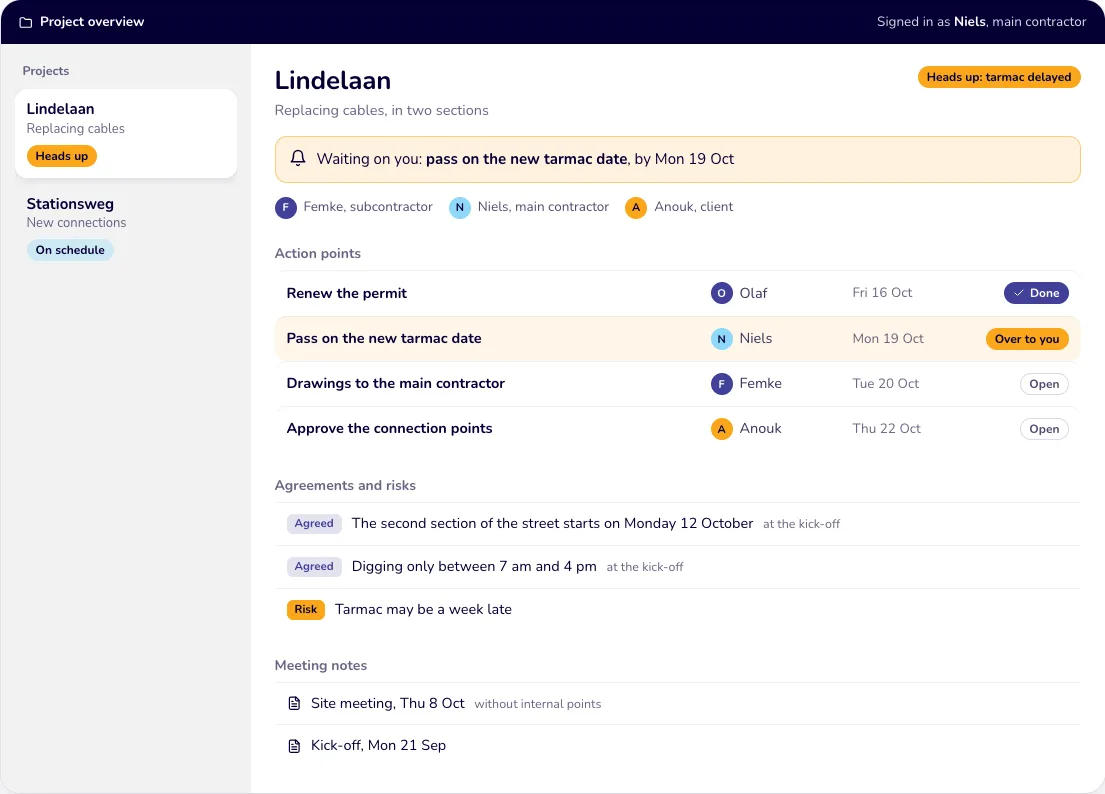
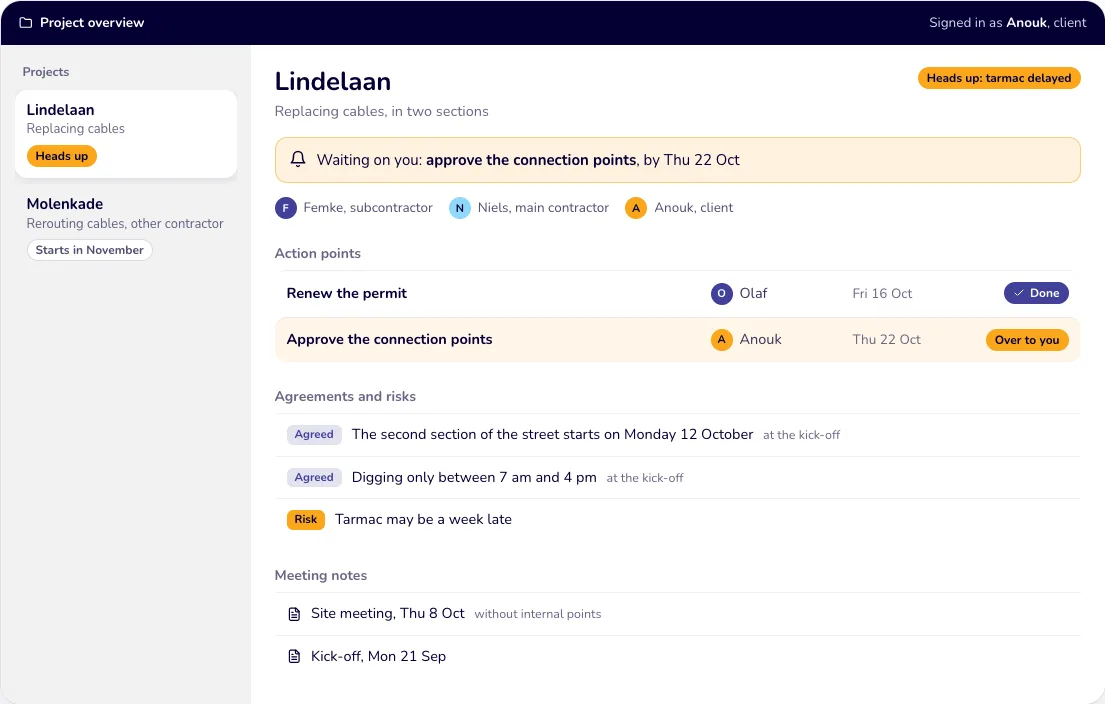
The same project, three overviews. Each party only sees what’s meant for them.
- Subcontractor: keeps it up to date
- Main contractor: sees their part
- Client: follows along
Subcontractor
Femke sees all her projects, including her own team’s internal notes. Waiting on you: drawings to the main contractor, by Tue 20 Oct
Main contractor
Niels only sees his own projects, and only what’s meant for him. Waiting on you: pass on the new tarmac date, by Mon 19 Oct
Client
Anouk follows her own projects and sees straight away what’s waiting for her approval. Waiting on you: approve the connection points, by Thu 22 Oct
Projects
- Replacing cables: Heads up
- New connections: On schedule
- Rerouting cables, other contractor: Starts in November
- Replacing cables, in two sections: Heads up: tarmac delayed
Action points
- Renew the permit (Fri 16 Oct)
- Pass on the new tarmac date (Mon 19 Oct)
- Drawings to the main contractor (Tue 20 Oct)
- Approve the connection points (Thu 22 Oct)
Agreements and risks
- Agreed: The second section of the street starts on Monday 12 October (from the kick-off)
- Agreed: Digging only between 7 am and 4 pm (from the kick-off)
- Risk: Tarmac may be a week late
- Internal: Crew short next week, two off sick (Only your own team)
Meeting notes
- Site meeting, Thu 8 Oct (full notes, without internal points)
- Kick-off, Mon 21 Sep
- Internal team meeting, Mon 5 Oct
Before and after
From ringing round to checking for yourself
Without an overview
- Agreements: Scattered across email, the group chat and loose minutes
- Who does what: ‘Someone was going to sort that.’ The permit expires.
- Where things stand: The main contractor calls three times
- Deadlines: You only find out when the crew is standing idle
- Who sees what: Everyone sees everything, or nothing at all
With one overview
- Agreements: In one place per project, the same version for everyone
- Who does what: Every action point has a name and a date
- Where things stand: He checks for himself, whenever it suits him
- Deadlines: A reminder two days beforehand
- Who sees what: Each party only sees what’s meant for them
Say: each running project brings in three status questions a week, at ten minutes each. With ten projects, you lose five hours every week to calling, searching and forwarding. With one overview, the main contractor checks for himself.
Good to know
- You carry on working the way you always have. You simply forward the notes. Nobody has to retype anything.
- You stay in control. The AI makes a suggestion. Nobody else sees it until you share it.
- Your partners follow along in their browser. With their own login, without installing anything.
- Tailored to you. Built around your projects, the companies you work with and your way of working. We’ve already built the base, the shared overview, for an infrastructure subcontractor.
We built the shared project overview, where each party only sees its own projects, for an infrastructure subcontractor. Reading meeting notes automatically, hiding individual points and sending reminders are parts we still build, tailored to your situation. All names, projects and details on this page are fictional.
Also works for
Works for any project with several parties
Event production
A production company shows the venue, suppliers and client what’s still to be done. Suppliers don’t see each other’s prices.
Marketing
An agency runs a campaign with the client, a photographer and a printer. The client signs off in the overview, and the printer only sees their own deadlines.
IT projects
A software company rolls out a new system with the customer and two suppliers. The customer sees the progress, not the internal schedule.
Sound familiar?
Let’s look at what this can do for you.